TL;DR
PHP2Shell affects the software that runs many websites, underneath WordPress and other content management systems. Updating the website alone does not fix it: whoever runs the server needs to install the PHP security update. The flaws are known to be exploited, so confirm that your host has patched the server and restarted its workers.
On 21 October 2026, PHP shipped emergency releases for two critical flaws in PHP itself, nicknamed PHP2Shell. If your website runs on WordPress, Drupal, Joomla, WooCommerce or anything else built on PHP, it stays exposed until its server runs a fixed PHP build.
I build and look after websites for small businesses, and most of the people I work with have never seen the PHP version their site runs on. This post is for them, and for anyone who builds sites for clients: what happened, who has to fix it, and how to check that it really is fixed.
What PHP2Shell is
PHP is the language that runs most of the web. W3Techs counts it on 69.3% of the websites where it can see the server-side language.
PHP runs 69.3% of sites with a detected server-side language
- PHP69.3%
- Other languages30.7%
PHP2Shell is two vulnerabilities in PHP’s core:
- CVE-2026-109618: when PHP runs out of memory partway through a request, it can leave internal data half set up, and the cleanup that follows treats that data as valid.
- CVE-2026-109619: data owned by one request can survive after its memory is freed, and a later request handled by the same worker can use it.
Both let an attacker run their own code on the server without logging in. PHP rates both 9.2 out of 10 (CVSS 4.0, critical). The PHP advisory says every PHP installation that serves web requests is at risk, and the risk is highest for Apache with mod_php, a common setup on shared hosting.
| PHP version | Status | What to do |
|---|---|---|
| 8.5 | Fixed in 8.5.12 | Update |
| 8.4 | Fixed in 8.4.27 | Update |
| 8.3 | Fixed in 8.3.36 | Update |
| 8.2 | Fixed in 8.2.35, end of life 31 December 2026 | Update now, plan 8.3 or 8.4 |
| 8.1, 8.0, 7.4 | End of life, source backports only | Ask your host for a patched build, upgrade |
| 7.3 and older | End of life, no fix from PHP | Upgrade |
The fixes were meant to come out on 22 October. On 20 October the CVE numbers leaked online with the wrong severity and the wrong date, and PHP moved the release forward a day. According to the PHP Foundation, a demonstration video was also published by mistake, and one vendor shipped patched software hours ahead of the agreed time. So attackers had a head start.
Why PHP2Shell is such a big deal
A few facts that explain why this one made headlines.
- It hid in PHP for more than 14 years. The researchers who found it trace the oldest affected code to PHP 5.4.0, released in March 2012. A 2024 security audit of PHP had already spotted early signs of the memory problem, and nobody could turn it into a working attack.
- AI found it. Calif, a security firm, found it auditing PHP with OpenAI’s GPT-5.6 Sol under OpenAI’s Patch the Planet program. Wiz found more ways in using Google’s Gemini 4 Argon, GPT-5.6 Sol and its own AI system. In Wiz’s words, “a single researcher completed in a week what previously would have taken a world-class team months of work.”
- The same tools work for attackers. Wiz warns that AI models “can help adapt an exploit to different PHP versions, configurations and memory layouts”, which “significantly lowers the barrier to scaling attacks”. So far it has not been easy: Sophos found that “building a working exploit is difficult, even with help from AI.” The PHP Foundation uses AI tools to check incoming reports, but says “a person makes every call.”
- The NSA told websites to go offline. The NSA’s advisory tells organizations that cannot patch right away to take the system offline until it is fixed, and expects attackers to weaponize the flaws. The FBI and CISA said the same.
- Big sites did unplug. Parts of Wikipedia and government websites in the Netherlands, Finland, France, Denmark and Germany were taken offline as a precaution, according to news reports. CERT-EU, the security team for the EU’s own institutions, published its own advisory.
- It touches much of the web. PHP runs on 69.3% of sites whose server-side language W3Techs detects, and Qualys counts about 71% of the PHP installations it sees on end-of-life versions (5.4 to 8.1) that get no official fix.
Is PHP2Shell a zero-day?
A zero-day vulnerability is a flaw attackers know about before a fix is available: the people running the software have had zero days to patch. A zero-day exploit is an attack that uses one. PHP2Shell started as a zero-day in both senses. The details leaked before the fix shipped, and Amazon reported an attack attempt against one of its honeypots on 17 October, before any public disclosure.
Since 21 October a fix exists, so on an updated server this is no longer a zero-day. Unpatched servers remain vulnerable. PHP 8.1 and older get no upstream release, but a vendor-patched build or source backport can include the fix. That does not restore upstream support for the old branch.
Why a WordPress or CMS update will not fix it
WordPress, like Drupal, Joomla and most other content management systems (CMSs), is an application that runs on PHP. PHP2Shell is a flaw in PHP, the layer underneath it. The update button, plugin and module updates, security plugins and maintenance mode all run inside PHP, after PHP has already read the incoming request. On mod_php, PHP’s advisory says the attack can happen “before any application code runs”. That is the limit every security plugin shares, Wordfence included, and it is one reason the best WordPress security plugin is still only part of a plan.
WordPress.org said it plainly: “No WordPress update is required or planned for these issues.” If you see a plugin that promises to fix PHP2Shell, do not install it. Patchstack, a WordPress security company, has warned against exactly that kind of unofficial “fix”. Drupal, TYPO3, PrestaShop and 1C-Bitrix said the same about their own software (table below).
Which CMSs are affected
All of them that run on PHP. The flaw is in PHP, not in the CMS, so every PHP-based CMS is exposed for as long as its server runs an unpatched PHP build, whatever CMS version it is on. These are the ten most used, by W3Techs’ count, with where each one shows your PHP version and what the project has said.
| CMS | Share of all websites | Where it shows your PHP version | What the project said |
|---|---|---|---|
| WordPress | 39.6% | Tools, Site Health, Info tab, Server | “No WordPress update is required or planned” |
| Joomla | 1.1% | System, System Information | Nothing published yet |
| Drupal | 0.6% | Reports, Status report | A PHP update “is the only complete mitigation” |
| PrestaShop | 0.5% | Advanced Parameters, Information | “Updating PrestaShop or your modules will not fix this” |
| 1C-Bitrix | 0.4% | Settings, Tools, Diagnostics, PHP settings | A product update “does not replace” the PHP update |
| TYPO3 | 0.3% | System Information toolbar, PHP Version | “TYPO3 itself is not affected and does not need to be updated” |
| OpenCart | 0.3% | No admin screen; ask your host or use a terminal | Nothing published yet |
| Contao | 0.1% | No admin screen; ask your host or use a terminal | Nothing published yet |
| Moodle | 0.1% | Site administration, Server, PHP info | “Unpatched sites remain vulnerable” |
| Craft CMS | 0.1% | Utilities, System Report | Craft Cloud is patched; nothing for self-hosted sites |
Shares are of all websites, from W3Techs, October 2026. “Nothing published yet” was checked on 23 October. Hosted platforms such as Shopify, Wix and Squarespace are left out: their providers run the servers, so there is nothing for you to update.
Who has to update PHP
This depends on who runs the server, not who runs the website.
| How your site is hosted | Who updates PHP | What you do |
|---|---|---|
| Shared hosting (HostGator, Bluehost, GoDaddy web hosting and similar) | The host | Check your version, ask the host to confirm the fix |
| Managed WordPress or CMS hosting | The host | Ask for confirmation in writing |
| A VPS or cloud server you or your developer set up | You or your developer | Update the PHP packages and restart PHP |
| Docker containers | Whoever builds the image | Pull the fixed image and redeploy |
| Squarespace, Wix, Shopify, or a static site | Not your problem | Nothing |
Many hosts started patching on the morning of 21 October. As of 21 October, HostGator and Bluehost both said the “majority of servers” were updated, with temporary protections in place meanwhile. “The majority” is not “your server”, so check.
Check which PHP version your site runs
You do not need to be a server admin for this. There are three ways: your site’s own admin screen, your hosting control panel, or a terminal.
Check which PHP version your WordPress site runs
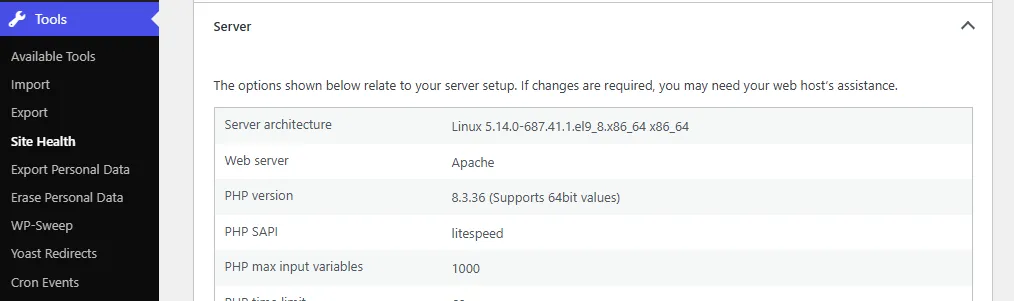
In the WordPress dashboard, go to Tools, then Site Health, then the Info tab, and open Server. The PHP version is listed there.
In Drupal, Joomla and other CMSs
Most CMSs show it in their admin screens too. The table above lists where, for the ten most used.
In your hosting control panel
Look for “PHP version”, “Select PHP version” or “MultiPHP Manager” (cPanel and WHM). If you host several sites, check each one; they can run different versions.
From a terminal
Some servers announce their PHP version in a response header. This only works when the server shows it, and many do not.
curl -sI https://example.com | grep -i x-powered-byx-powered-by: PHP/8.3.36A line like that tells you the version (here, a fixed 8.3 release). If it shows 8.1 or older, the site is on an end-of-life version and needs an upgrade. If nothing comes back, the server hides it; use one of the other two ways.
Why the version number is not proof
Here is the catch. Many Linux distributions and hosting control panels fix old PHP versions by patching them in place, without changing the version number. Ubuntu 24.04, for example, still reports PHP 8.3.6 after its fix, and some control panels rebuilt PHP 7.4, 8.0 and 8.1 keeping the numbers they had before. So “8.3.6” can be patched, and “8.1.34” can be either.
The only reliable answer comes from whoever runs the server. Ask your host this, word for word:
Is the PHP build serving my domain patched for CVE-2026-109618 and CVE-2026-109619, and when were the PHP workers restarted?
The restart matters. Running PHP processes keep the old code in memory until they restart, so a server can have the fixed package installed and still be running the vulnerable one.
How to update PHP
On shared or managed hosting, the fix is the host’s job, but you can still move your site to a newer PHP version. Use the PHP version setting in the control panel (Bluehost, HostGator and GoDaddy all have one, and on cPanel it is MultiPHP Manager), and pick 8.3 or 8.4.
Before you switch a site:
- Take a full backup of the files and the database.
- Update the CMS (WordPress, Drupal, Joomla or whatever it runs), its theme and its plugins or modules first. Old plugins are the usual reason a site breaks on a newer PHP.
- If your host offers a staging copy, switch PHP there first and click through the site.
- Switch the live site, then check the home page, a form, the checkout if there is one, and the admin.
If you run your own server, install your distribution’s PHP security update
(or the official 8.5.12, 8.4.27, 8.3.36 or 8.2.35 releases), then restart
PHP-FPM or Apache. Docker users need to pull the rebuilt php image and
redeploy, since a running container never picks up a new image on its own.
PHP’s 23 October follow-up
also recommends session.upload_progress.enabled=0 until the next regular
bugfix release for an additional, unusual session-serialization attack path.
It requires specific configuration and runtime changes described in that
notice; this setting is not a substitute for the PHP2Shell patches. For
Windows, use the 26 October rebuilt packages,
which update the bundled Brotli library as well. Their -1 package suffix
does not change the PHP runtime version.
PHP 8.1 and older: end of life
PHP 8.1 and every version before it are end of life: the PHP project no longer releases fixes for them. For PHP2Shell the security team published source code backports for 7.4, 8.0 and 8.1, which only help people who compile PHP themselves. Some hosts and vendors (Ubuntu Pro, Debian ELTS, CloudLinux, TuxCare, cPanel, Plesk) ship patched builds of old versions. Nothing official exists for 7.3 and older.
By W3Techs’ figures, about a third of PHP websites still run PHP 7 or PHP 5. If yours is one of them, this is the push to upgrade. Skip 8.2: it is fixed today, but it reaches end of life on 31 December 2026, so plan the move to a longer-supported branch.
If an old site cannot be updated or upgraded soon, the UK’s National Cyber Security Centre and WordPress.org both say to consider taking it offline until it can.
Zero-day protection: stopgaps, and why they are only stopgaps
- Web application firewalls. Cloudflare switched on protective rules for every plan, free included, early on 21 October, and AWS, Akamai and Fastly have rules too. Cloudflare calls its rules defense in depth and says attackers were already changing their requests to get around them. A firewall in front of your site also does nothing if the server still answers requests that skip it, which is one of the traps in running Cloudflare and Wordfence together.
- The one-line setting. The most shared workaround,
session.upload_progress.enabled = 0, blocks known attack paths for one of the two flaws (CVE-2026-109619). It does nothing for the other. - PHP’s own word on all of this: “There are no complete mitigations, updating is the only safe choice.”
Is the PHP zero-day being exploited?
Yes. CISA added both CVE-2026-109618 and CVE-2026-109619 to its Known Exploited Vulnerabilities catalog on 26 October 2026. Both appear in the catalog dated 30 October. The earlier reports of attempts without confirmed compromises are no longer a current description of the risk.
Patch the server, restart its workers, and investigate any signs of an intrusion. Installing the fix closes these vulnerabilities; it does not remove a webshell or other access an attacker already established.
The last big PHP flaw, CVE-2024-4577 in 2024, was attacked widely, including by ransomware groups, and for months after the fix shipped. If your site was exposed and you suspect anything, ask your host or developer to check for unfamiliar files and change your passwords and keys.
If you build sites for clients
Your clients will ask whether they are safe, and on shared hosting you often do not control the server either. The checklist:
- List every PHP site you built or maintain, with its host and PHP version.
- Patch or upgrade the ones you run yourself.
- For the rest, send the client (or their host) the question above, in writing, and keep the answer.
- Move anything on PHP 8.1 or older onto 8.3 or 8.4, starting with the sites that take payments or logins.
A short note to a client can be as plain as this:
A serious security flaw in PHP, the software your website runs on, was fixed on 21 October. Updating the website itself does not cover it. I have asked your host to confirm your site’s server is patched and will let you know when they reply. Your site also runs an older PHP version that no longer gets fixes, so I recommend we move it to PHP 8.4 this month.
The headlines move on. An unpatched server stays exposed.
Sources
- PHP advisory.
- PHP Foundation.
- Wiz’s words.
- NSA’s advisory.
- news reports.
- its own advisory.
- Qualys counts.
- WordPress.org.
- A PHP update “is the only complete mitigation”.
- “Updating PrestaShop or your modules will not fix this”.
- A product update “does not replace” the PHP update.
- “TYPO3 itself is not affected and does not need to be updated”.
- “Unpatched sites remain vulnerable”.
- Craft Cloud is patched.
- W3Techs.
- 23 October follow-up.
- 26 October rebuilt packages.
- Known Exploited Vulnerabilities catalog.
- CVE-2024-4577.
Frequently asked questions
Will updating WordPress or my CMS fix PHP2Shell?
No. The flaws are in PHP itself, the software that runs WordPress, Drupal, Joomla and most other CMSs, not in the CMS. WordPress.org has said no WordPress update is required or planned, and Drupal, TYPO3, PrestaShop and 1C-Bitrix have said the same about theirs. The fix is a patched PHP build on the server: 8.5.12, 8.4.27, 8.3.36 or 8.2.35, or a vendor build that carries the same fix.
Does a security plugin protect my site from PHP2Shell?
No. On the most exposed setup, Apache with mod_php, the attack can happen while PHP is still reading the request, before WordPress, Drupal, Joomla or any plugin or module runs. A plugin cannot block something that happens before it loads.
Which PHP versions are affected by PHP2Shell?
The official records list PHP 8.2 before 8.2.35, 8.3 before 8.3.36, 8.4 before 8.4.27 and 8.5 before 8.5.12. The researchers who found the flaws say the problem goes back as far as PHP 5.4. Treat every version older than the fixed releases as affected.
Is there a fix for PHP 7.4, 8.0 or 8.1?
Not from the PHP project as a release. Those versions are end of life. The PHP security team published source code backports for 7.4, 8.0 and 8.1, and some Linux distributions, control panels and extended support vendors ship patched builds. Ask your host which build you are on, and plan the move to PHP 8.3 or 8.4.
How do I check my PHP version in WordPress?
In the WordPress dashboard go to Tools, then Site Health, then the Info tab, and open Server. The PHP version is listed there. Your hosting control panel shows it too.
Which CMSs are affected by PHP2Shell?
Every CMS that runs on PHP, as long as its server runs an unpatched PHP build: WordPress, Joomla, Drupal, PrestaShop, 1C-Bitrix, TYPO3, OpenCart, Contao, Moodle, Craft CMS and the rest. The flaw is in PHP, so the CMS and its version do not matter. The fix is the same for all of them: a patched PHP on the server.
Is PHP2Shell being exploited?
Yes. CISA added both PHP2Shell vulnerabilities to its Known Exploited Vulnerabilities catalog on 26 October 2026. Treat an unpatched internet-facing PHP server as exposed. Install the fixed PHP build, restart its workers, and investigate suspected compromise rather than assuming a patch removes an existing intrusion.
What is a zero-day vulnerability?
A zero-day is a security flaw that attackers know about, or start using, before a fix is available, so the people running the software have had zero days to patch it. Once a fix ships it stops being a zero-day for everyone who installs it, and stays a live risk for everyone who does not.
Is PHP2Shell a zero-day?
It started as one. The CVE numbers leaked on 20 October 2026, a day before the fix, and Amazon reported an attack attempt against one of its honeypots on 17 October, before any public disclosure. Since PHP released 8.5.12, 8.4.27, 8.3.36 and 8.2.35 on 21 October, a fix exists. Servers on unsupported PHP branches remain exposed unless their host supplies a patched vendor build or source backport. Lack of upstream support does not mean no patch exists.
Is PHP 8.2 safe to upgrade to?
PHP 8.2.35 is fixed, but PHP 8.2 reaches end of life on 31 December 2026 and gets no security fixes after that. If you are upgrading anyway, go to PHP 8.3 or 8.4.